> For the complete documentation index, see [llms.txt](https://docs.bogos.io/llms.txt). Markdown versions of documentation pages are available by appending `.md` to page URLs; this page is available as [Markdown](https://docs.bogos.io/cn/quick-start-guide/launch-your-first-offer.md).
# 启动您的第一个优惠活动
本指南将带您完成 BOGOS 的设置并创建您的第一个优惠活动。
开始使用 BOGOS 应用包含 7 个基本步骤:
1. [安装 BOGOS 并选择您的套餐](#install-bogos-and-choose-your-plan)
2. 在您的主题上[启用应用嵌入](#enable-app-embed)
3. [创建您的第一个优惠活动](#create-your-first-offer)
4. [设置您的优惠活动](#set-up-your-offer)
5. [下一笔测试订单](#place-a-test-order)
6. [查看数据分析](#check-the-analytics)
7. 在店铺中[自定义优惠活动的展示方式](#customize-how-your-offer-appears-on-storefront)
### 安装 BOGOS 并选择您的套餐
从 Shopify App Store 安装 BOGOS 后,请选择适合您业务需求的套餐:
* \*\*免费套餐:\*\*获得 30 笔终身订单,在正式付费前探索 BOGOS 的核心功能,了解它在您店铺中的实际效果。
* \*\*付费套餐:\*\*解锁无限订单量及全部高级功能,享有 7 天免费试用。每个套餐均包含每月免费订单额度,仅在超出额度后才收取使用费,且上限根据您的 Shopify 套餐设定最高金额。
📜 如需查看详细定价方案,请访问 [BOGOS 定价页面](https://bogos.io/pricing/)。
### 启用应用嵌入
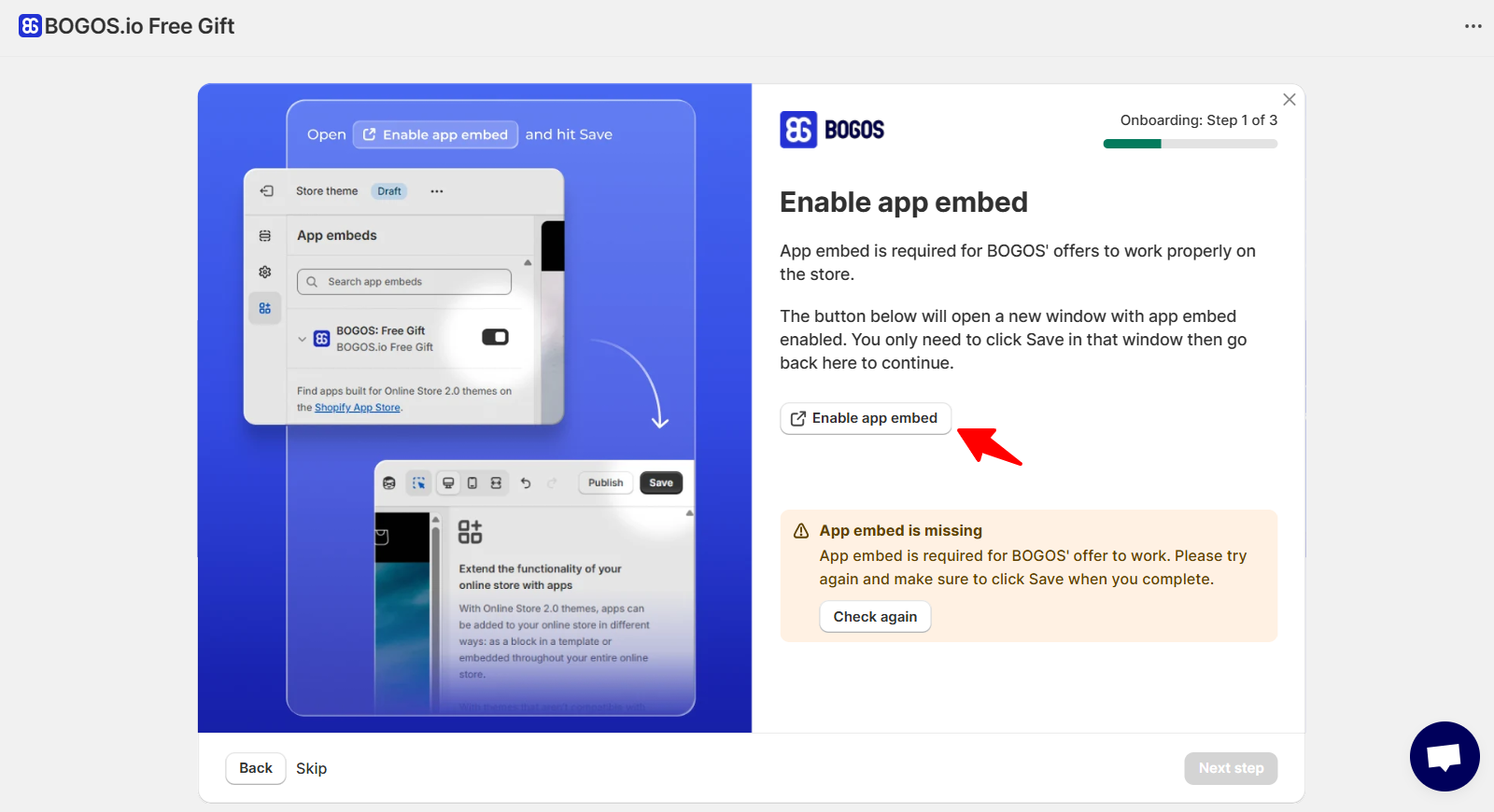
让我们通过启用应用嵌入,使 BOGOS 在您的店铺中生效:
1. 在引导页面上,点击“启用应用嵌入”,即可快速跳转至您的主题编辑器。
2. 点击右上角的保存按钮。
3. 返回应用。如果状态变为绿色,即表示设置成功。
### 创建您的第一个优惠活动
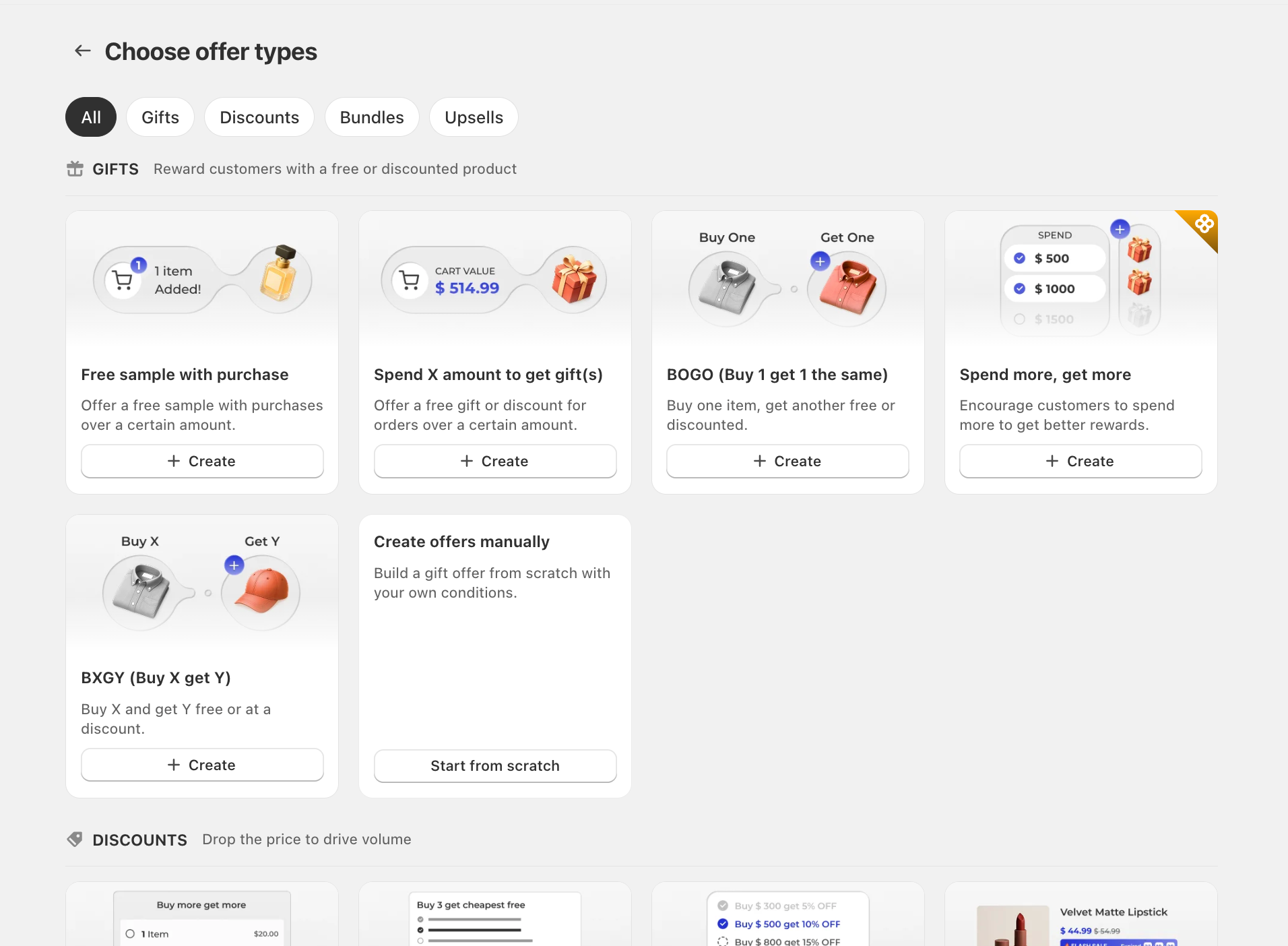
选择与您目标相符的优惠类型:
* [**赠品优惠**](/cn/detailed-guide/gift-offer/create-gift-offer.md) —— 当顾客的购物车或商品满足特定条件时,提供免费或折扣赠品。
* [**捆绑优惠**](/cn/detailed-guide/bundle-offer.md) —— 让顾客以折扣价购买商品组合。
* [**追加销售优惠**](/cn/detailed-guide/upsell-offer.md) —— 在主要购买商品旁推荐互补商品。
* [**折扣优惠**](/cn/detailed-guide/discount-offer.md) —— 通过折扣鼓励顾客购买更大数量的商品。
### 设置您的优惠活动
在优惠活动设置页面中,填写以下几项内容以完成设置:
* **优惠信息** —— 添加名称、标题、排期及其他基本详情。
* **主要条件与子条件** —— 设置顾客需满足的条件,优惠才会生效(购物车金额、数量、特定商品等)。
* **奖励** —— 定义顾客将获得的内容(赠品、折扣、免运费等)。
* **其他设置** —— 根据需要设置附加规则,包括组合选项、自定义购物车中的代码展示,以及其他高级设置。
设置完成后,点击“发布”即可上线(或保存为“草稿”以便日后修改)。
### 下一笔测试订单
为确保一切按预期运作,请针对您刚设置的优惠活动下一笔测试订单:
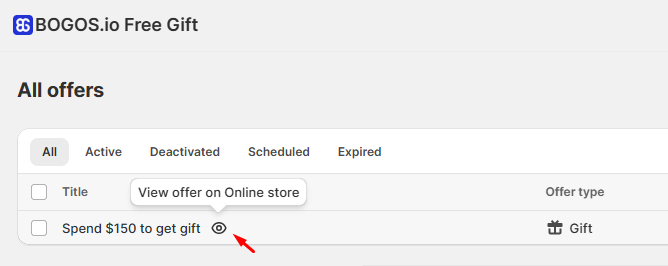
1. 将鼠标悬停在优惠活动标题旁,点击眼睛图标即可快速预览优惠活动。
2. 将符合优惠条件的商品加入购物车。
3. 检查优惠活动是否正确显示,并应用了正确的折扣或赠品。
4. 完成结账以下一笔测试订单。[参见 Shopify 关于下测试订单的指南](https://help.shopify.com/en/manual/checkout-settings/test-orders/processing-test-order)
### 查看数据分析
确认您的优惠活动设置及追踪是否正常运作:
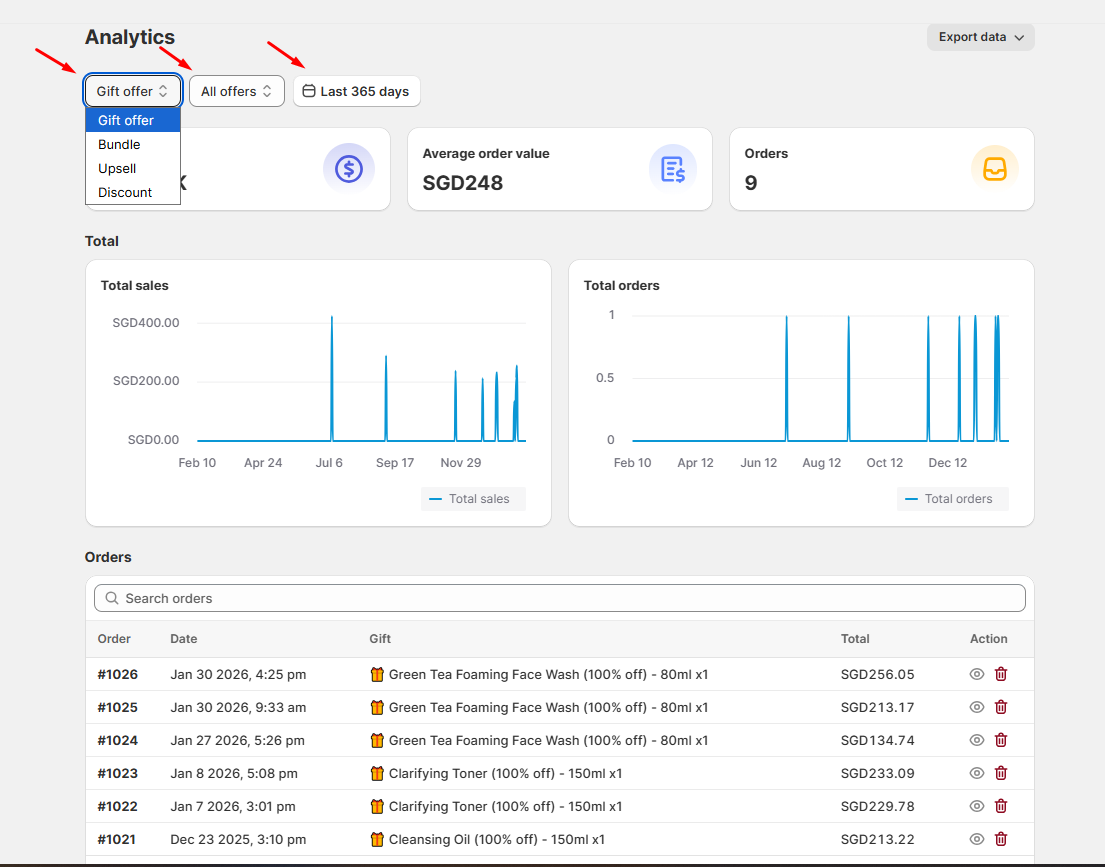
1. 进入数据分析页面。
2. 使用可用的筛选器来细化数据:
* 优惠类型(赠品、捆绑包、追加销售、折扣)
* 特定优惠活动
* 日期范围
3. 查看关键指标,例如订单数、总销售额和平均订单价值。
4. 检查订单列表,确认您的测试订单已出现。
📜 如需了解更多详情,请查看 [数据分析](/cn/detailed-guide/analytics.md) 指南。
### 自定义优惠活动的展示方式
优惠活动生效后,您可以自定义其外观,使其与店铺风格相匹配。
1. 进入“自定义”页面。
2. 选择您想要设置样式的优惠活动。
3. 您可以调整显示规则、文字、颜色和布局。
📜 如需了解更多详情,请查看 [自定义](/cn/detailed-guide/customize.md) 指南。
### 后续步骤
太棒了!您已成功使用 BOGOS 应用启动了第一个优惠活动!
准备好更进一步了吗?以下是您接下来可以探索的内容:
* [助推器工具](/cn/detailed-guide/boosters.md),有效向顾客推广您的优惠活动
* [翻译选项](/cn/detailed-guide/translation.md),在不同语言中正确展示您的优惠内容
* [赠品优惠的库存设置](https://docs.bogos.io/cn/quick-start-guide/pages/Mx3lvcuUc7WbeGnDYigH#id-5.-gift-inventory-management)
* BOGOS 应用与其他第三方应用之间的[高级集成](broken://pages/Z9VsNUkd4fda644sqTiP),以扩展功能
---
# Agent Instructions
This documentation is published with GitBook. GitBook is the documentation platform designed so that both humans and AI agents can read, navigate, and reason over technical content effectively. Learn more at gitbook.com.
## Querying This Documentation
If you need additional information that is not directly available in this page, you can query the documentation by asking a question.
Perform an HTTP GET request on the following URL with the `ask` and `goal` query parameters:
```
GET https://docs.bogos.io/cn/quick-start-guide/launch-your-first-offer.md?ask=&goal=
```
`ask` is the immediate question: it should be specific, self-contained, and written in natural language.
`goal` is what the user is ultimately trying to achieve, the reason they need the answer. Sharing it helps GitBook give you a better, more relevant answer. A goal is most helpful when it describes the outcome the user wants rather than restating the question. For example, with `ask=how do I create an API token`, a goal like `automate deployments from our CI pipeline` lets GitBook tailor the answer to that use case.
The response will contain a direct answer to the question and relevant excerpts and sources from the documentation.
Use this mechanism when the answer is not explicitly present in the current page, you need clarification or additional context, or you want to retrieve related documentation sections.