> For the complete documentation index, see [llms.txt](https://docs.bogos.io/llms.txt). Markdown versions of documentation pages are available by appending `.md` to page URLs; this page is available as [Markdown](https://docs.bogos.io/cn/quick-start-guide/customize-widget-color.md).
# 自定义小组件颜色
本指南介绍如何自定义 BOGOS 优惠小组件的颜色,使其与您店铺的品牌风格相匹配。
自定义 BOGOS 小组件颜色包含 3 个基本步骤:
1. [进入颜色自定义字段。](#navigate-to-color-customization)
2. 通过颜色选择器选择颜色,或直接输入十六进制代码(例如 #000000 表示黑色),来[自定义小组件颜色](#customize-widget-colors)。
3. [自定义强调色](#customize-accent-color-on-checkout-and-thank-you-page-upsell)(仅适用于结账页和感谢页追加销售)。
4. 点击保存。
## 进入颜色自定义设置
访问颜色自定义设置:
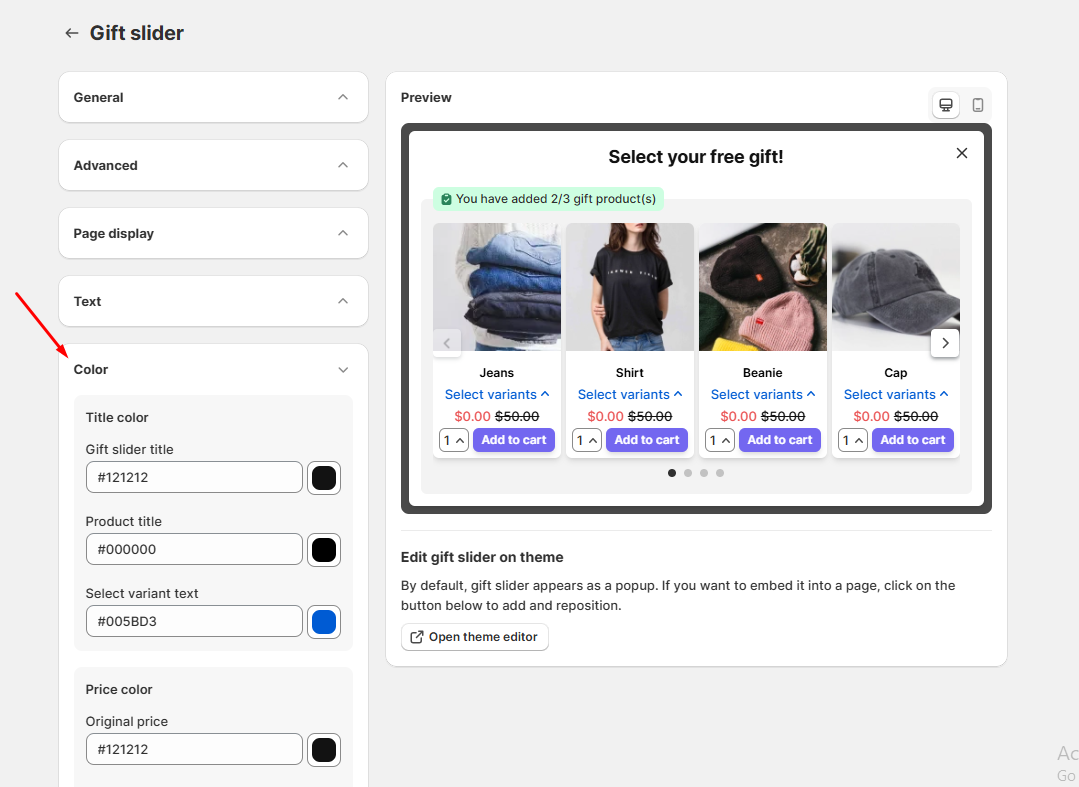
1. 从 BOGOS 后台,进入“自定义”页面。
2. 点击您想要自定义的任意功能。
3. 找到“颜色”部分。
## 自定义小组件颜色
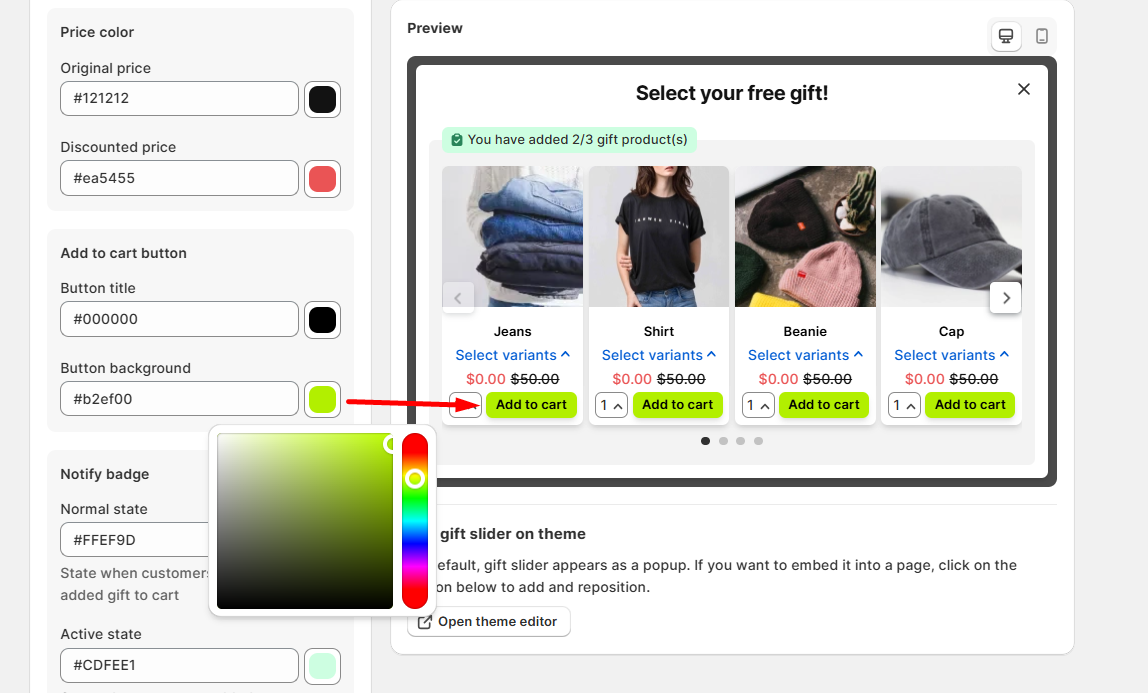
您可以自定义小组件上的所有颜色元素,包括背景、价格、按钮、文字、徽章及其他视觉组件。
要更改任意颜色元素:
1. 找到您想调整的颜色字段。
2. 通过以下方式自定义颜色:
* 点击颜色框以打开颜色选择器 > 通过点击色谱或调整色相滑块选择您喜欢的颜色。
* 或者,直接在文本框中输入十六进制代码(例如 #000000 表示黑色)。
3. 使用屏幕右侧的预览小组件实时预览您的更改。
4. 点击页面顶部的保存按钮。
注意:
* 部分功能提供颜色模板,帮助您快速完成设置。
* 如果您在自定义颜色以匹配品牌风格时需要帮助,欢迎联系我们的支持团队。
## 自定义结账页与感谢页追加销售的强调色
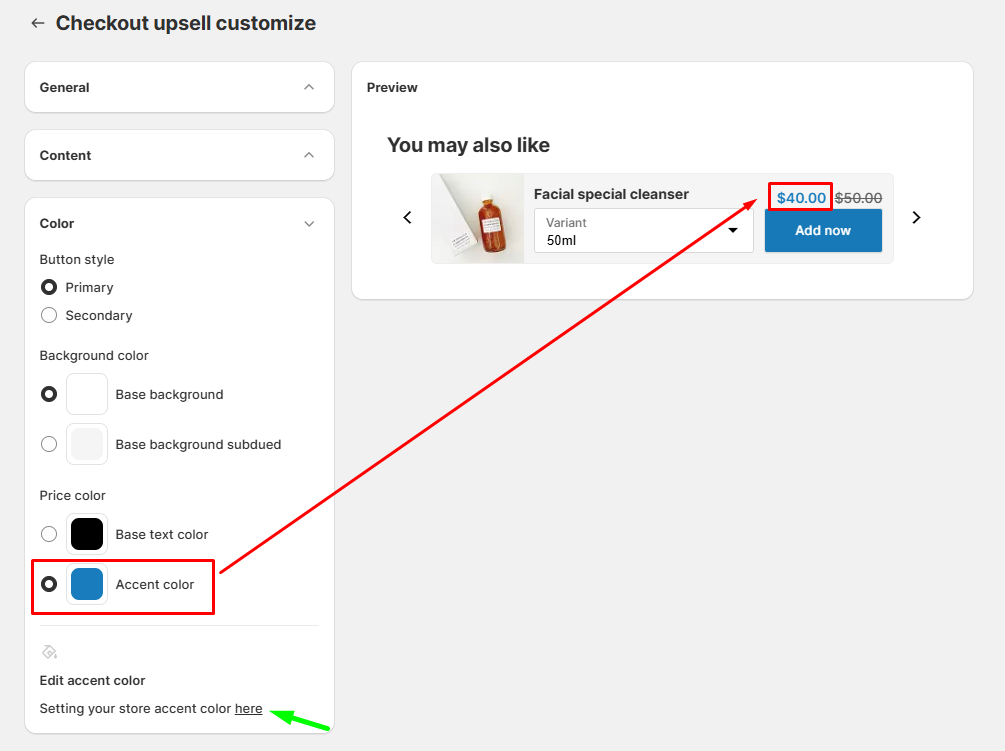
一般而言,强调色用于控制结账页面上高亮内容、链接和行动号召组件等特定元素。
对于 BOGOS 的结账页追加销售和感谢页追加销售,您可以将该强调色应用于价格,使其与您的结账主题保持一致,呈现更统一的视觉效果。
自定义强调色:
1. 点击“在此设置您店铺的强调色”链接,即可跳转至主题编辑器。
2. 找到“强调色”字段。
3. 点击颜色框使用颜色选择器进行调整,或输入十六进制代码(例如 #000000)。
4. 点击保存。
注意:更改强调色将更新所有使用该颜色的结账组件,包括 BOGOS 追加销售小组件中的价格显示。
---
# Agent Instructions
This documentation is published with GitBook. GitBook is the documentation platform designed so that both humans and AI agents can read, navigate, and reason over technical content effectively. Learn more at gitbook.com.
## Querying This Documentation
If you need additional information that is not directly available in this page, you can query the documentation by asking a question.
Perform an HTTP GET request on the following URL with the `ask` and `goal` query parameters:
```
GET https://docs.bogos.io/cn/quick-start-guide/customize-widget-color.md?ask=&goal=
```
`ask` is the immediate question: it should be specific, self-contained, and written in natural language.
`goal` is what the user is ultimately trying to achieve, the reason they need the answer. Sharing it helps GitBook give you a better, more relevant answer. A goal is most helpful when it describes the outcome the user wants rather than restating the question. For example, with `ask=how do I create an API token`, a goal like `automate deployments from our CI pipeline` lets GitBook tailor the answer to that use case.
The response will contain a direct answer to the question and relevant excerpts and sources from the documentation.
Use this mechanism when the answer is not explicitly present in the current page, you need clarification or additional context, or you want to retrieve related documentation sections.